AI lab, part 1: a GB200 GPU cluster on your laptop (minus the GPUs)
Table of Contents
A GB200-class GPU cluster emulated on a single Linux machine: what it is, what you can practise with it, and how to set it up. Most of the work in AI infrastructure isn’t the GPUs. It’s everything around them: the scheduler that places an 8-GPU job inside one NVLink domain, the BMC you power-cycle a tray through at 3 a.m., the dashboard that shows which user is holding 6 of the 8 GPUs, the runbook for a degraded NVLink. Systems engineers who want to learn this hit a wall quickly: you can’t practise on a GB200 rack you don’t have, and cloud GPU instances hide exactly the layers you want to touch. ai-lab is my attempt at a way around that wall. It’s a complete GPU cluster that runs on a single Linux machine. The GPUs are fake, and everything around them is real. The lab emulates one NVIDIA GB200-class NVL8 NVLink domain: Around that hardware it runs the software stack of a production GPU cluster: Slurm with accounting or Kubernetes (k3s) with Kueue, OpenLDAP users, a shared filesystem (JuiceFS on RustFS), per-user S3 buckets, node-local scratch, and Prometheus with Grafana. Each piece is an Incus system container, and Ansible configures all of it behind a This is the part that makes the lab useful, so it’s worth being precise about it. The trays expose Nothing is actually computed. Tensors hold zeros, so the numbers coming out of a training run mean nothing. Everything that sits above the numbers can be exercised, though: scheduling, binding, accounting, telemetry, failure handling and out-of-band management. From the scheduler’s point of view, a tray looks like this: Management interfaces feed back into that view. If you disable two of a GPU’s NVLinks through the BMC, No GPU, no NVIDIA driver, no cloud account. I wrote this series on a 12-core desktop with 93 GiB of RAM. On a smaller machine, the figure to check is 16 GiB of free RAM, not 16 GB installed: the containers’ memory limits add up to 27 GiB (32 GiB in Kubernetes mode), even though the running lab uses about 10 GiB. Choosing the scheduler. One line in To switch on a built cluster, run When The A tray looks like any other GPU node: The trays idle at about 140 W and 32 °C. Start a job and those numbers climb, and the same values show up in Prometheus ( It’s not a performance model. Timings are approximations, and the fake NCCL ranks never talk to each other, so a dead peer doesn’t hang a collective the way it would on real hardware. It’s also not a scale model: it has one NVLink domain, one switch tray and one InfiniBand leaf, which is enough to exercise every interface but nothing more. Containers share the host kernel, so Slurm jobs aren’t cgroup-confined, and the Kubernetes GPUs come from the lab’s own device plugin rather than NVIDIA’s. The repository’s README lists the remaining limitations. Part 2: Slurm. We look at how the cluster is configured, run GPU jobs from What it is
Makefile.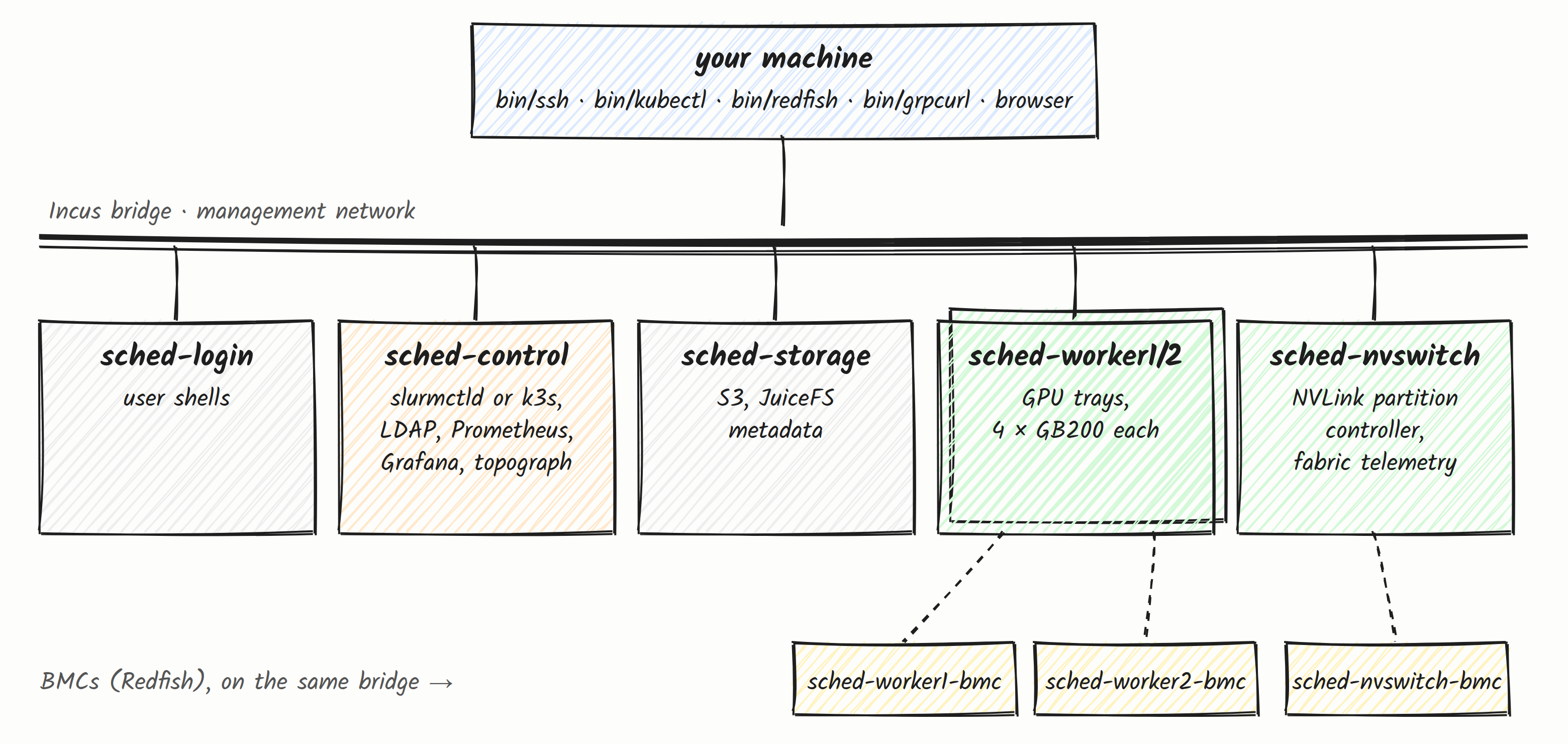
The emulation boundary
/dev/nvidia0-3, plus stub versions of the NVIDIA userspace: CUDA driver, NVML, cuBLAS, cuDNN, NCCL and nvidia-smi. Because those stubs implement the same APIs, PyTorch, Ray and NCCL run unmodified. Every call succeeds and takes realistic simulated time: a GEMM costs its FLOPs at roughly GB200 rates, and an all-reduce costs its bytes at NVLink bandwidth. While a job runs, the GPUs report load, memory, power and temperature that rise and fall with it.$ bin/ssh sched-worker1 nvidia-smi topo -m
GPU0 GPU1 GPU2 GPU3 CPU Affinity NUMA Affinity GPU NUMA ID
GPU0 X NV18 NV18 NV18 0-3 0 N/A
GPU1 NV18 X NV18 NV18 0-3 0 N/A
GPU2 NV18 NV18 X NV18 0-3 0 N/A
GPU3 NV18 NV18 NV18 X 0-3 0 N/ANV18 turns into NV16 for that GPU. If you move a tray into its own NVLink partition, Slurm’s block topology or Kubernetes’ node labels change within a minute. Parts 4 and 5 are built around that feedback loop.What you can do with it
topology/block) or a real Kubernetes setup (device plugin, GPU Feature Discovery, Kueue topology-aware scheduling, JobSet).make up && make test builds and verifies the whole cluster from scratch.Requirements
make, Python 3, Go, jq and git.incus-admin group./var/lib/incus, which includes a 5.6 GB PyTorch/Ray virtualenv.Setup
git clone https://github.com/arkady-emelyanov/ai-lab.git && cd ai-lab
make init          # host side: Ansible venv, secrets, Go builds, host checks
make up            # create and configure the cluster (~15 minutes)
make frameworks    # PyTorch + Ray on the shared volume (optional, several GB)
make test          # end-to-end checks
make init doesn’t run anything as root on the host. Instead it ends with a host check that prints the exact command for anything missing. The usual ones are group membership, an AppArmor rule so Incus’ DNS works with NetworkManager, and the inotify and kernel-keyring limits that unprivileged containers run into. When the host is ready, it says so:$ make check
host readyinventory/group_vars/all.yml picks it:scheduler: slurm # or: k3smake down, change the line, then make up. Volumes survive the rebuild, so homes, the frameworks venv and object data are kept. The two modes never run side by side, but everything below the scheduler (GPUs, BMCs, fabric, storage, monitoring) is identical.First contact
make up finishes, you have nine containers, each with a pinned address:$ incus list --all-projects -c ns4 -f compact
NAME STATE IPV4
sched-control RUNNING 10.107.111.10 (eth0)
sched-login RUNNING 10.107.111.11 (eth0)
sched-nvswitch RUNNING 10.107.111.34 (eth0)
sched-nvswitch-bmc RUNNING 10.107.111.33 (eth0)
sched-storage RUNNING 10.107.111.12 (eth0)
sched-worker1 RUNNING 10.107.111.21 (eth0)
sched-worker1-bmc RUNNING 10.107.111.31 (eth0)
sched-worker2 RUNNING 10.107.111.22 (eth0)
sched-worker2-bmc RUNNING 10.107.111.32 (eth0)bin/ wrappers look the addresses up in Incus, so you never need to type them:bin/ssh login # login node as joe (joe's lab key, no password)
bin/ssh root@sched-worker1 # any instance as root, with the generated admin key
bin/redfish sched-worker1 /redfish/v1/Systems/System_0$ bin/ssh sched-worker1 nvidia-smi
+-----------------------------------------------------------------------------------------+
| NVIDIA-SMI 580.95.05 Driver Version: 580.95.05 CUDA Version: 13.0 |
+-----------------------------------------+------------------------+----------------------+
…
| 0 NVIDIA GB200 On | 0000:18:00.0 Off | 0 |
| N/A 32C P8 138W / 1200W | 512MiB / 189471MiB | 0% Default |
…http://10.107.111.10:9090) and Grafana (http://10.107.111.10:3000, user admin, password in .secrets/grafana.pass). Keep the Lab overview dashboard open while you work through the rest of the series.What it is not
Next in the series
srun up to PyTorch DDP across both trays, drain and resume nodes, and watch it all in Prometheus.